
Workbook Info for Excel | metadata through custom functions

Content
- What is Workbook Info for Excel
- Key features
- Why use Workbook Info
- Installation instructions
- Instructions
- Function reference
- Change history
- Credits
What is Workbook Info for Excel
Workbook Info for Excel is a free add-in that exposes workbook, worksheet, table, chart, pivot table, slicer, and name metadata through read-only custom functions and Excel Entity data types.
The functions are read-only and designed for building live documentation, audit sheets, and workbook diagnostics directly in the grid.
Key features
- Custom functions that return:
- Workbook-level metadata (name, author, save date, query count, external link count)
- Worksheet metadata (used range, used rows/columns, protection state, tab color, visibility)
- Object metadata for tables, charts, pivot tables, slicers, and defined names
- INFO functions that return Excel Entity values
- Entity properties can be accessed with dot notation (for example
=A1.usedRange) or withFIELDVALUE - Nested collections on workbook and worksheet entities (for example
worksheets/worksheetCount,tables/tableCount) - Task pane Actions tab: insert a demo / Table of Contents worksheet and recalculate the workbook
Why use Workbook Info for Excel
- Document workbook internals quickly, right into your cell grid using functions, without VBA or Office Scripts
- Create formula-based audit sheets that stay live as workbook structure changes
- Use one consistent metadata interface across desktop and web Excel
Example:
=JKP.WORKBOOKINFO()Installation instructions
Instructions
Open the add-ins task-pane to get a list of functions and their explanations by clicking the Formulas tab, Workbook Info button:
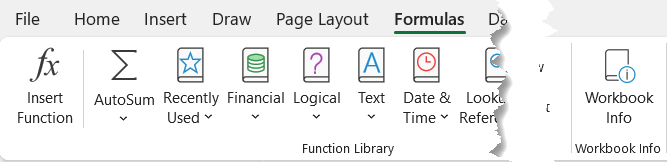
Taks pane
Clicking the button opens the task pane. It has three tabs:
Reference tab
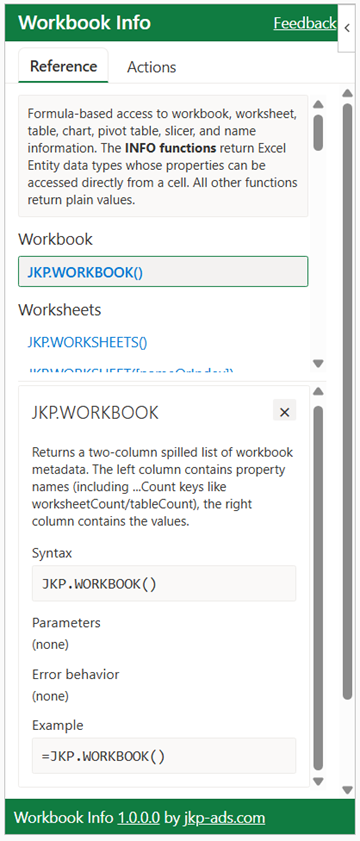
This tab display the function reference. Clicking on a function reveals
a card displaying information about the function.
Actions tab
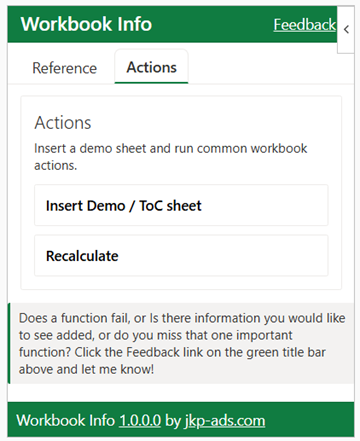
The Actions tab currently allows two things:
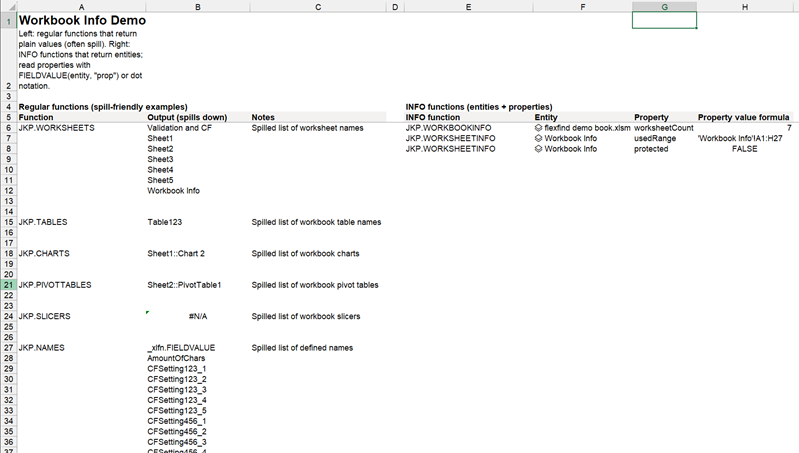
- Inserting a demo worksheet which could serve as the start of a Table of Contents:
- A button that forces a recalculation of all formulas, thus updating the cached object names returned by the functions.
Settings tab
The Settings tab contains a language switcher with an Auto option. Auto follows your Excel app language for the task pane UI. This switcher does not change function names or function-description language, and ribbon language is controlled by the Excel app language.
How to use the functions
All functions belonging to this add-in start with the JKP. prefix. Simply type =JKP. in a cell and the autocomplete list will display them. The addin has two groups of functions. Regular functions and data type functions.
Regular functions
All functions belonging to this add-in start with the JKP. prefix. Simply type =JKP. in a cell and the autocomplete list will display them. The addin has two groups of functions. Regular functions and data type functions. The regular functions often accept an argument. Worksheet selector parameters accept a sheet name or a 1-based index. If omitted, functions use the worksheet containing the formula.
Data type functions (INFO functions)
Functions ending with INFO return data types, which makes it easy to retrieve detailed information pertaining to the data type in question. Here is a screen-shot of the =JKP.WORKBOOKINFO() function result in a cell:
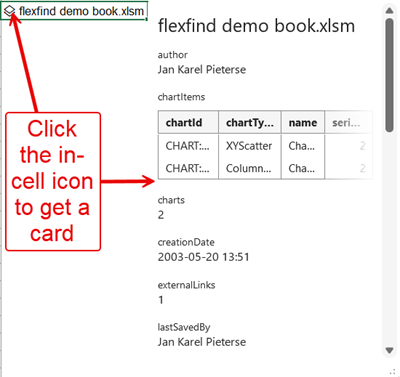
Clicking the tiny icon in the cell opens a card.
Inside the card, buttons may appear next to items in the card, allowing you to get that information into the grid:
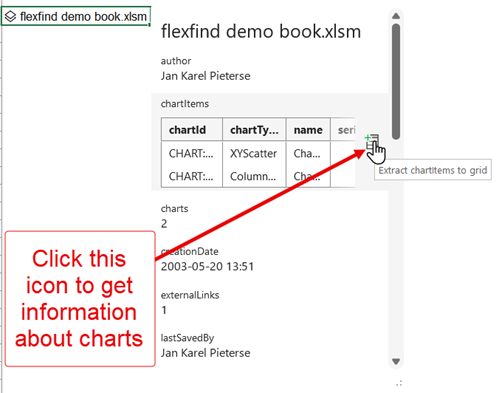
You can also retrieve information of a data type cell by referring to that cell in a formula and pressing the period:
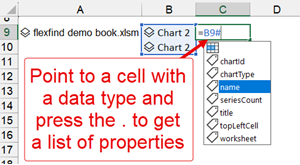
The functions are dynamic-array aware. Some functions return an array of items (such as JKP.WORKSHEETS). You can point subsequent functions at that array and expect Excel to understand.
Note that these functions are NOT volatile. If
workbook data changes, they do not automatically update. To force a
refresh, press Control+Alt+Shift+F9 (or use the task pane Actions
tab and click Recalculate). Alternatively, do a workbook-wide
search and replace (for example, replace JKP. with
JKP.).
Function reference
Functions are grouped by category. Each table lists the function name, description, syntax, parameters, and error behavior. For INFO functions, the description includes the available Entity properties.
Workbook functions
JKP.WORKBOOKworksheetCount,
tableCount, chartCount,
pivotTableCount, slicerCount,
nameCount, queryCount,
and externalLinkCount.JKP.WORKBOOK()JKP.WORKBOOKINFOEntity properties:
name,
author, lastSavedBy,
creationDate,
worksheetCount, worksheets,
tableCount, tables,
pivotTableCount, pivotTables,
slicerCount, slicers,
chartCount, charts,
nameCount, names,
queryCount, queries (queries[*]
has name, error,
refreshDate, rowsLoadedCount,
loadedTo, loadedToDataModel),
externalLinkCount, externalLinks
(externalLinks[*] has id
(URL))JKP.WORKBOOKINFO()Worksheet functions
JKP.WORKSHEETSJKP.WORKSHEETS()JKP.WORKSHEETJKP.WORKSHEET([nameOrIndex])- #N/A: Named item does not exist
- #NUM!: Index out of bounds
- #VALUE!: Wrong argument type
JKP.OFFSETSHEETJKP.OFFSETSHEET(offset)- #NUM!: Out of bounds
- #VALUE!: Wrong argument type
JKP.USEDRANGEJKP.USEDRANGE([sheet])- #N/A: Named item does not exist
- #NUM!: Index out of bounds
- #VALUE!: Wrong argument type
JKP.USEDROWSJKP.USEDROWS([sheet])- #N/A: Named item does not exist
- #NUM!: Index out of bounds
- #VALUE!: Wrong argument type
JKP.USEDCOLUMNSJKP.USEDCOLUMNS([sheet])- #N/A: Named item does not exist
- #NUM!: Index out of bounds
- #VALUE!: Wrong argument type
JKP.PROTECTEDJKP.PROTECTED([sheet])- #N/A: Named item does not exist
- #NUM!: Index out of bounds
- #VALUE!: Wrong argument type
JKP.WORKSHEETINFOEntity properties:
name,
usedRange, usedRows,
usedColumns, protected,
tabColor, visibility,
tableCount, tables,
chartCount, charts,
pivotTableCount, pivotTables,
slicerCount, slicers,
nameCount, namesJKP.WORKSHEETINFO([nameOrIndex])- #N/A: Named item does not exist
- #NUM!: Index out of bounds
- #VALUE!: Wrong argument type
Table functions
JKP.TABLES#N/A! when there are no matching items
for the requested parent (for example, no tables
on that worksheet).JKP.TABLES([sheet])- #N/A: Named item does not exist
- #N/A!: No items found for the requested parent (for example, no tables on that worksheet)
- #NUM!: Index out of bounds
- #VALUE!: Wrong argument type
JKP.TABLEROWSJKP.TABLEROWS(tableName)- #N/A: Table does not exist
- #VALUE!: Wrong argument type
JKP.TABLECOLUMNSJKP.TABLECOLUMNS(tableName)- #N/A: Table does not exist
- #VALUE!: Wrong argument type
JKP.TABLEADDRESSJKP.TABLEADDRESS(tableName)- #N/A: Table does not exist
- #VALUE!: Wrong argument type
JKP.TABLECOMMENTJKP.TABLECOMMENT(tableName)- #N/A: Table does not exist
- #VALUE!: Wrong argument type
JKP.TABLEINFOEntity properties:
name,
worksheet, rowCount,
columnCount, address,
commentJKP.TABLEINFO(tableName)- #N/A: Table does not exist
- #VALUE!: Wrong argument type
JKP.TABLESINFOEntity properties:
name,
worksheet, rowCount,
columnCount, address,
comment (one entity per row in the
spilled result)JKP.TABLESINFO([sheet])- #N/A: Named item does not exist
- #NUM!: Index out of bounds
- #VALUE!: Wrong argument type
Chart functions
JKP.CHARTSSheet::ChartName.
Returns #N/A! when there are no matching
items for the requested parent (for example, no
charts on that worksheet).JKP.CHARTS([sheet])- #N/A: Named item does not exist
- #N/A!: No items found for the requested parent (for example, no charts on that worksheet)
- #NUM!: Index out of bounds
- #VALUE!: Wrong argument type
JKP.CHARTTYPEJKP.CHARTTYPE(chartName)- #N/A: Chart does not exist
- #VALUE!: Ambiguous chart name; more than one chart has the same name
- #VALUE!: Wrong argument type
JKP.CHARTTITLEJKP.CHARTTITLE(chartName)- #N/A: Chart does not exist
- #VALUE!: Ambiguous chart name; more than one chart has the same name
- #VALUE!: Wrong argument type
JKP.SERIESCOUNTJKP.SERIESCOUNT(chartName)- #N/A: Chart does not exist
- #VALUE!: Ambiguous chart name; more than one chart has the same name
- #VALUE!: Wrong argument type
JKP.CHARTINFOEntity properties:
chartId,
name, worksheet,
chartType, title, seriesCount,
topLeftCellJKP.CHARTINFO(chartName)- #N/A: Chart does not exist
- #VALUE!: Ambiguous chart name; more than one chart has the same name
- #VALUE!: Wrong argument type
JKP.CHARTSINFOEntity properties:
chartId,
name, worksheet,
chartType, title, seriesCount,
topLeftCell (one entity per row in
the spilled result)JKP.CHARTSINFO([sheet])- #N/A: Named item does not exist
- #NUM!: Index out of bounds
- #VALUE!: Wrong argument type
Pivot table functions
JKP.PIVOTTABLESSheet::PivotName. Returns
#N/A! when there are no matching items
for the requested parent (for example, no pivot
tables on that worksheet).JKP.PIVOTTABLES([sheet])- #N/A: Named item does not exist
- #N/A!: No items found for the requested parent (for example, no pivot tables on that worksheet)
- #NUM!: Index out of bounds
- #VALUE!: Wrong argument type
JKP.PIVOTLOCATIONJKP.PIVOTLOCATION(pivot)Sheet::PivotName;
also accepts a single pivot name or a spilled range
of pivot identifiers).- #N/A: Pivot table does not exist
- #VALUE!: Ambiguous pivot table name; more than one pivot table has the same name
- #VALUE!: Wrong argument type
JKP.PIVOTSOURCEJKP.PIVOTSOURCE(pivot)Sheet::PivotName;
also accepts a single pivot name or a spilled range
of pivot identifiers).- #N/A: Pivot table does not exist
- #VALUE!: Ambiguous pivot table name; more than one pivot table has the same name
- #VALUE!: Wrong argument type
JKP.PIVOTSOURCETYPELocalRange, LocalTable,
or Unknown.JKP.PIVOTSOURCETYPE(pivot)Sheet::PivotName;
also accepts a single pivot name or a spilled range
of pivot identifiers).- #N/A: Pivot table does not exist
- #VALUE!: Ambiguous pivot table name; more than one pivot table has the same name
- #VALUE!: Wrong argument type
JKP.PIVOTINFOEntity properties:
pivotId,
name, worksheet,
id, locationAddress, filterAxisAddress,
rowLabelsAddress, columnLabelsAddress,
dataBodyAddress, sourceType,
source, allowMultipleFiltersPerField,
enableDataValueEditing, refreshOnOpen,
useCustomSortLists, layoutType,
showRowGrandTotals, showColumnGrandTotals,
showFieldHeaders, preserveFormatting,
subtotalLocationJKP.PIVOTINFO(pivot)Sheet::PivotName;
also accepts a single pivot name or a spilled range
of pivot identifiers).- #N/A: Pivot table does not exist
- #VALUE!: Ambiguous pivot table name; more than one pivot table has the same name
- #VALUE!: Wrong argument type
JKP.PIVOTSINFOEntity properties:
pivotId,
name, worksheet,
locationAddress, sourceType,
source (one entity per row in the spilled
result)JKP.PIVOTSINFO([sheet])- #N/A: Named item does not exist
- #NUM!: Index out of bounds
- #VALUE!: Wrong argument type
Slicer functions
JKP.SLICERSSheet::SlicerName. Returns
#N/A! when there are no matching items for
the requested parent (for example, no slicers on
that worksheet).JKP.SLICERS([sheet])- #N/A: Named item does not exist
- #N/A!: No items found for the requested parent (for example, no slicers on that worksheet)
- #NUM!: Index out of bounds
- #VALUE!: Wrong argument type
JKP.SLICERITEMSJKP.SLICERITEMS(slicer)Sheet::SlicerName;
also accepts a single slicer name or a spilled range
of slicer identifiers).- #N/A: Slicer does not exist
- #VALUE!: Ambiguous slicer name; more than one slicer has the same name
- #VALUE!: Wrong argument type
JKP.SLICERINFOitems
property (when available) is a collection of
ITEMINFO entities (each item has
name and selected;
selected may be blank for slicer types/hosts
where selection state isn't available).Entity properties:
slicerId,
name, worksheet,
id, caption, topLeftCell,
left, top, width,
height, style, sortBy,
isFilterCleared, itemCount,
items (items[*] is
ITEMINFO with name,
selected)JKP.SLICERINFO(slicer)Sheet::SlicerName;
also accepts a single slicer name or a spilled range
of slicer identifiers).- #N/A: Slicer does not exist
- #VALUE!: Ambiguous slicer name; more than one slicer has the same name
- #VALUE!: Wrong argument type
JKP.SLICERSINFOitems/itemCount.
Call JKP.SLICERINFO() (or JKP.SLICERITEMS())
when you need slicer items.Entity properties:
slicerId,
name, worksheet,
caption, style, isFilterCleared,
topLeftCell (one entity per row in
the spilled result)JKP.SLICERSINFO([sheet])- #N/A: Named item does not exist
- #NUM!: Index out of bounds
- #VALUE!: Wrong argument type
Name functions
JKP.NAMES#N/A! when there are no matching items
for the requested parent (for example, no names
in that scope).JKP.NAMES([scopeOrSheet])- #N/A: Sheet does not exist
- #N/A!: No items found for the requested parent (for example, no names in that scope)
- #VALUE!: Wrong argument type
JKP.NAMEREFERSJKP.NAMEREFERS(name)- #N/A: Name does not exist
- #VALUE!: Wrong argument type
JKP.NAMETYPEJKP.NAMETYPE(name)- #N/A: Name does not exist
- #VALUE!: Wrong argument type
JKP.NAMEVISIBLEJKP.NAMEVISIBLE(name)- #N/A: Name does not exist
- #VALUE!: Wrong argument type
JKP.NAMECOMMENTJKP.NAMECOMMENT(name)- #N/A: Name does not exist
- #VALUE!: Wrong argument type
JKP.NAMEINFOEntity properties:
name,
formula, value,
type, visible, comment,
scope, sheetJKP.NAMEINFO(name)- #N/A: Name does not exist
- #VALUE!: Wrong argument type
JKP.NAMESINFOEntity properties:
name,
formula, value,
type, visible, comment,
scope, sheet (one entity
per row in the spilled result)JKP.NAMESINFO([scopeOrSheet])- #N/A: Sheet does not exist
- #VALUE!: Wrong argument type
Change history
- Build 1.0.4.0, 2026-06-04: Removed unsupported lastSaveTime workbook property and updated related metadata/docs.
- Build 1.0.3.0, 2026-06-04: Fixed duplicate function registration and fixed Demo/ToC sheet insertion.
- Build 1.0.2.0, 2026-05-21: Manifest updates and function help-link updates.
- Build 1.0.1.0, 2026-04-28: Added full localization (EN, NL, DE, FR, ES).
- Build 1.0.0.0, 2026-04-27: First release
Credits
Workbook Info is developed by Jan Karel Pieterse (JKP Application Development Services).
Thanks to users and testers who provided feedback on formulas, entity behavior, and task pane UX.
Comments