
Creating an addin from an Excel macro
Pages in this article
- Preparations
- Book or add-in
- Menus
- Toolbars
- Limit access
- Protect code
- Initialise
- Save Settings
- UI Languages
- Setup
- Conclusion
Protecting Your Code
Generally spoken there are two important reasons why VBA code would be protected:
- To avoid inadvertent changes to the code, by inexperienced users.
- To protect ones copyright.
The Visual Basic Editor offers the option to lock a project for viewing. From
within the VBE, choose Tools, VBAProject Properties. Select the second tab and
check the "Lock Project for Viewing" checkbox:
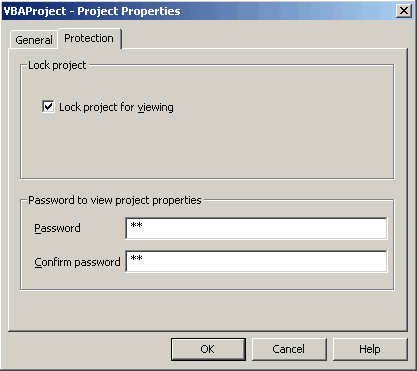
The protection tab of the VBAProject properties dialog.
After that, optionally enter a password.
Unfortunately, the level of protection this offers is bad. One can download small programs from internet that remove the password in the blink of an eye and with a simple HEX editor, one can do the same manually by simply replacing three or four characters inside the file.
The only really secure way to protect the code is by NOT using VBA, but rather by building the application in e.g. VB6 or by creating a com addin using Office developer edition.


Frequently asked Questions
What are the main reasons to protect VBA code in an Excel addin?
How can you lock a VBA project for viewing in the Visual Basic Editor?
What steps are involved in setting a password to protect VBA code?
Why is the built-in VBA project protection considered weak?
What tools or methods can be used to remove VBA project passwords?
What is the only really secure way to protect your Excel addin code?
How does building an application in VB6 or creating a COM addin improve code protection?
What does the "Lock Project for Viewing" option do in the VBAProject properties?
What are the risks of leaving VBA code unprotected in an Excel addin?
Can a simple HEX editor be used to bypass VBA project password protection?