
Problems removing an Excel Add-in
Introduction
As you probably know by now, I offer a number of tools for your daily Excel work:
Sometimes you decide you no longer need an add in and delete the file from your system. But now, every time you launch Excel, it starts to complain:

Very irritating, as this message pops up every single time you launch Excel.
Trying to solve this (the wrong way)
So let's open the add-ins dialog: File, Options, Add-ins tab, click that "Go..." button to access this dialog:
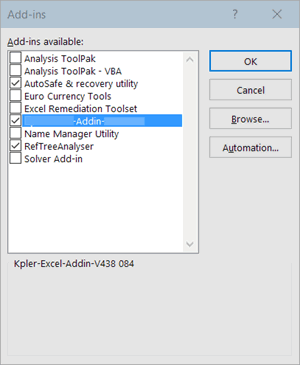
Now try to click on that add-in (in blue in this screen-shot). Excel asks you if you want it removed:

Hey, this is great! Let's click Yes. This is what the add-ins dialog looks like after doing so:
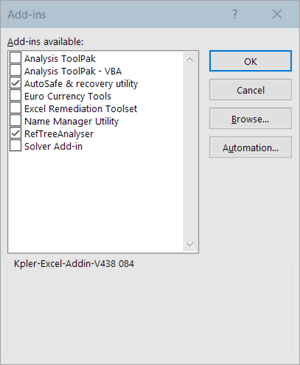
Look! The addin has left the building! But wait. Close the dialog, close Excel and restart Excel. This is what happens:
Grrrrrr. Excel apparently hasn't really removed the add-in from its list.
Solving the problem
So let's open the add-ins dialog: File, Options, Add-ins tab, click that "Go..." button to access the add-ins dialog once more:
See? The add-in is still there!
Now try to click on that add-in (in blue in this screen-shot). Excel asks you if you want it removed:
Here's the deal: click No.
Next, uncheck the box next to the add-ins name:
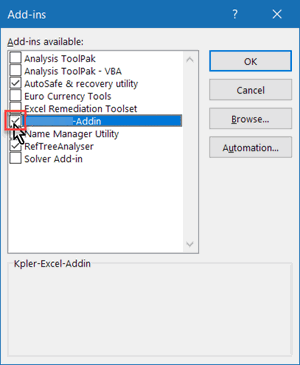
Again, Excel asks you to remove the add-in:
Click No
Click the Close button on the add-ins dialog. Excel pops up a familiar message:
Ignore the message and shut down Excel and open it again. The irritating error message should be gone, but we're not there yet. Open the add-ins dialog. Click on the name of the add-in. Excel asks again:
This time, click Yes.
DONE!
Frequently asked Questions
What are common problems when removing an Excel add-in?
Why does Excel show error messages after deleting an add-in file?
How can I access the add-ins dialog in Excel?
What happens if I click Yes when Excel asks to remove an add-in in the add-ins dialog?
Why does the add-in still appear in Excel after I removed it from the add-ins dialog?
What is the correct way to remove an Excel add-in to avoid error messages?
What should I do when Excel asks to delete the add-in file during removal?
How do I uncheck an add-in in the add-ins dialog?
What should I do after unchecking the add-in to complete its removal?
How do I know when the Excel add-in has been completely removed?
Comments