
Wrapping Formulas In An Error Test
Pages in this article
First version
Oftentimes I have a range filled with formulas that as such work correctly, but need an error checking mechanism. Take for example the following simple situation:
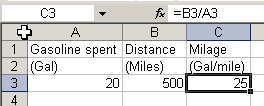
If cell A3 contains no data or a zero, the result in C3 will be #DIV/0!
If you don't want the errors to show, the solution is simple: test for zero:
=IF(A3=0,"",B3/A3)
But I tend to have much more complicated formulas, in which it is not always just one cell that might cause an error of some sort, so I need to wrap the entire formula in an error check. I thought it might be useful to have a generic little tool that lets you specify how to wrap the current function in a cell with an error test.
Here is the first try at a subroutine:
Sub ChangeFormulas()
Dim oCell As Range
Dim sFormula As String
Dim sInput As String
Static sFormulaTemplate As String
If sFormulaTemplate = "" Then
sFormulaTemplate =
"=IF(ISERROR(_form_),"""",_form_)"
End If
sInput = InputBox("Enter base formula", , sFormulaTemplate)
If sInput = "" Then Exit Sub
sFormulaTemplate = sInput
For Each oCell In Selection
sFormula = Replace(sFormulaTemplate,
"_form_", Right(oCell.Formula, Len(oCell.Formula) - 1))
oCell.Formula = sFormula
Next
End Sub
So how does this work?
You select the cells with the formulas that need worked over.
Then run the sub. An Input box is shown with a default template to
change the formula:
=IF(ISERROR(_form_),"",_form_)
What this means is that the current formula in the cell is going to be placed at each location where it says "_form_". Edit the formula template to match your need and click OK.
Because sFormulaTemplate is declared as Static, the utility remembers the template for a next time you use it.

Frequently asked Questions
What is the purpose of wrapping formulas in an error test?
How can you prevent errors like #DIV/0! from showing in Excel formulas?
What is a simple example of an error check formula for division?
Why might you need to wrap an entire formula in an error check rather than just one cell?
What does the provided VBA subroutine ChangeFormulas do?
How do you use the ChangeFormulas subroutine to modify formulas in selected cells?
What is the default formula template used in the ChangeFormulas subroutine?
How does the ChangeFormulas subroutine remember the last used formula template?
What should you do if you want to customize the error test formula in the subroutine?
What is the role of the InputBox in the ChangeFormulas subroutine?