
Handling Worksheet control events using a class module
Pages in this article
Setting up the worksheet
I devised a worksheet that has two sets of option buttons, each set having their own Groupname (Set01 and Set02 respectively) to make them work as two separate groups of buttons:
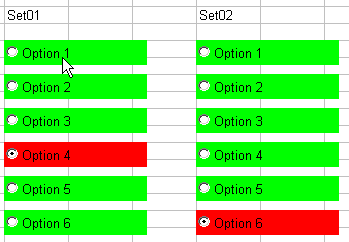
Figure 1: Option button controls from the control toolbox on a worksheet
The idea here is to ensure that the currently selected option button will become red and the not selected option buttons will become green. Also I'd like to get feedback on which option button has been selected.

Frequently asked Questions
What is the purpose of using a class module to handle worksheet control events?
How are the option buttons grouped on the worksheet?
What are the group names assigned to the two sets of option buttons?
How many option buttons are there on the worksheet?
What visual feedback is given when an option button is selected?
What color does the selected option button change to?
What color do the non-selected option buttons change to?
What is the main idea behind the option button color changes?
What image illustrates the option button controls on the worksheet?
How does the worksheet provide feedback on which option button is selected?