
Charting a mathematical equation using Excel and defined names
Pages in this article
Create the Chart
Because we cannot start creating a chart without data, simply add some data to a couple of cells:
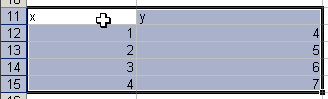
and click the chart wizard button. Make sure to select the "XY (scatter)" chart type and hit Finish.
Now define two names local to the worksheet the chart is on:
Now we need to use these two defined names in the chart's SERIES formula (click the line in the chart and then click the formula bar), currently looking like this:

(Note this shows the SERIES formula as I see it, with the semicolon as list separator.)
Edit this formula so it looks like this:
=SERIES(Sheet1!$B$8,Sheet1!x,Sheet1!y,1)
Cell B8 will contain the chart's title, so we'll put this little formula in B8:
="Charting: " & Sheet1!$B$1


Frequently asked Questions
How do you start creating a chart in Excel with data?
What chart type should be selected to chart a mathematical equation?
How do you define names local to the worksheet for charting?
What cell ranges are used for the defined names 'x' and 'y'?
How do you edit the chart's SERIES formula to use defined names?
What is the purpose of cell B8 in the chart?
What formula is used in cell B8 to set the chart's title?
How do you access the chart wizard in Excel?
Why is the semicolon used as a list separator in the SERIES formula?
What steps are involved in charting a mathematical equation using Excel and defined names?